

Turn your VPN subscription into dozens of proxies. Each port keeps its own fixed IP.
Proxy Farm runs on your computer and opens local SOCKS5/HTTP ports. Each port is its own tunnel to exactly one VPN server. No Docker, no terminal, no admin rights.
Version 0.2.0 · macOS 12 or later (Apple silicon, Intel) · Windows x64
- Free, MIT licensed
- Uses your own VPN plan
- No telemetry
- 127.0.0.1:29001 · Tokyo · JP · HMA · 42 msExit IP: 203.0.113.10
- 127.0.0.1:29002 · Tokyo · JP · HMA · 47 msExit IP: 203.0.113.24
- 127.0.0.1:29003 · Singapore · SG · Surfshark · 38 msExit IP: 198.51.100.30
- 127.0.0.1:29004 · Amsterdam · NL · ZoogVPN · 61 msExit IP: 198.51.100.71
- 127.0.0.1:29005 · Amsterdam · NL · ZoogVPN · 58 msExit IP: 198.51.100.84
- 127.0.0.1:29006 · Frankfurt · DE · Surfshark · 66 msExit IP: 192.0.2.45
- 203.0.113.10free
- 203.0.113.24free
- 203.0.113.37free
- 198.51.100.30free
- 198.51.100.71free
- 198.51.100.84free
- 198.51.100.92free
- 192.0.2.45free
See Proxy Farm working
From adding a VPN account to a running proxy port, recorded straight from the app.
Vietnamese and English captions are available in the player.
Three steps, no terminal
Everything happens in one desktop app. You do not set up a server or change your network settings.
Connect your VPN subscription
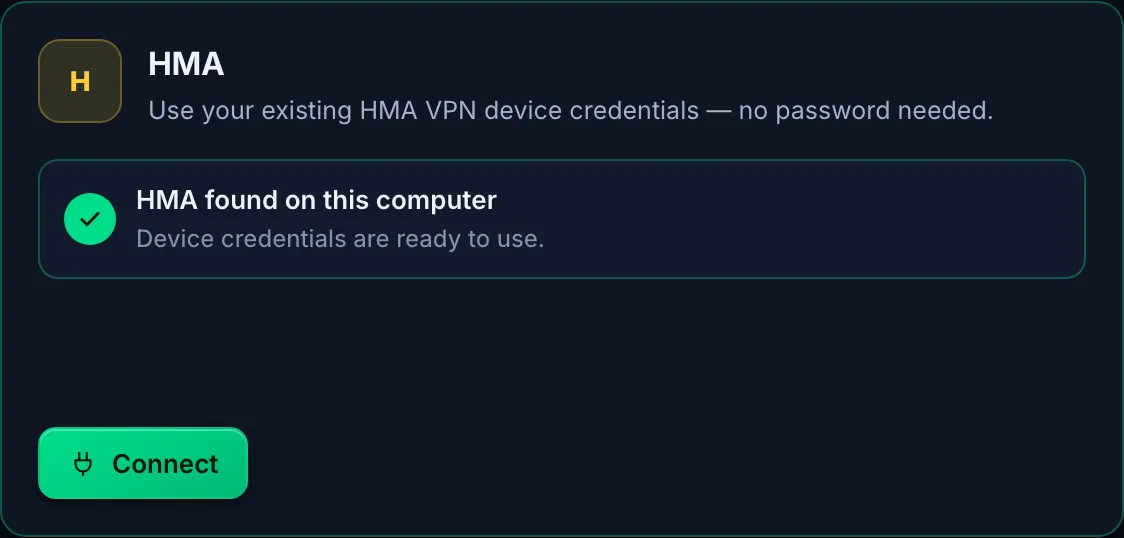
Pick a provider and enter the credential that provider gives you. Each card has a guide for getting it. For HMA, the app reads the credentials of the HMA app on the same computer.
Pick locations and port counts
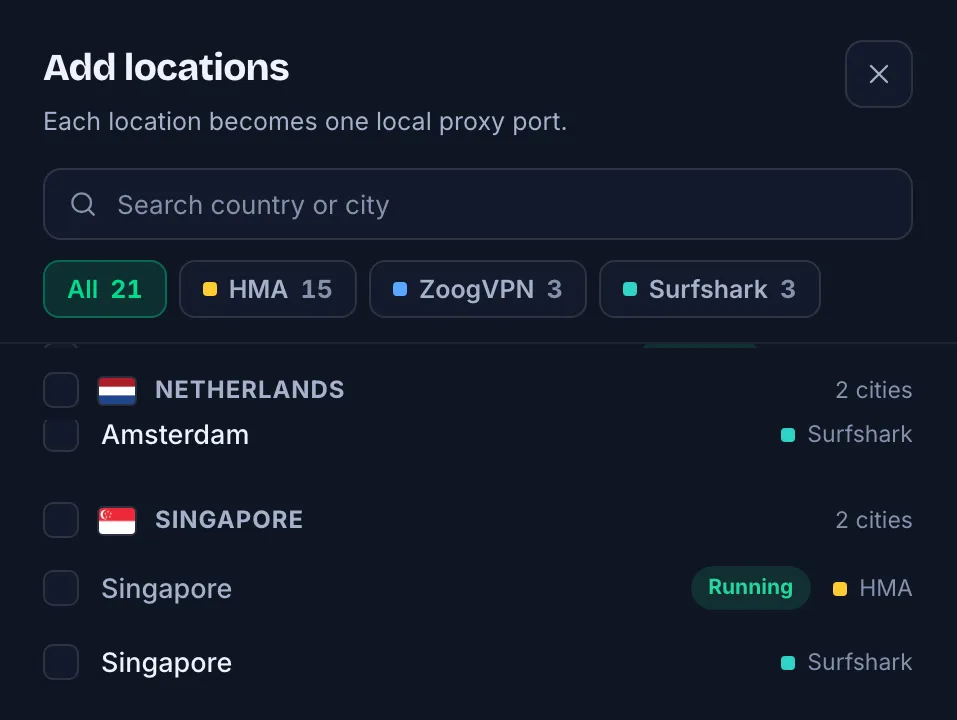
Search for a city and choose how many ports it gets. Each port is pinned to its own server at that location.
Paste the proxies into your tools
When a port shows Online, copy it as host:port:user:pass, a socks5:// URL or a curl command, and paste it into a browser, an anti-detect profile or a script.



Does a few things, and does them right
What the app actually does, as documented by the project.
One IP per port
- One port, one server, one exit IP
- Each port runs its own tunnel to one VPN server. A location with several servers holds several ports, each with a different IP.
- SOCKS5 and HTTP on the same port
- Every port serves both protocols, with a proxy username and password generated on first run.
- Sticky exit IPs
- A dropped port retries the same server first. It moves only when that server is dead or refuses your account.
Change IP when you choose
- Change IP
- Moves a port to another free server of the same location, then checks that the exit IP really changed.
- Auto-rotate
- Rotate a port every N minutes. An optional rotate webhook for scripts is off by default.
Know which ports are alive
- Live status per port
- Connecting, online, retrying with a countdown and the reason, or failed with guidance. Exit IP, country and latency.
- Alive/dead filters and Check all
- Filter the failing ports and re-check every port in one click.
- Export proxies
- Export as host:port:user:pass, socks5://, host:port or curl.
- CSV export and save to file
- Save the proxy list as a CSV or text file.
Runs on your computer
- No admin, no system VPN
- Each port runs its own unmodified sing-box process in userspace: no TUN device, no driver, no routing changes.
- No leaks to your real connection
- A port’s only way out is its tunnel. If the tunnel drops, the proxy fails instead of falling back to your home network.
- Encrypted secrets, no telemetry
- Passwords and keys are encrypted with your operating system’s key store. The app sends no usage data anywhere.
Bring the VPN you already have
Proxy Farm does not sell IPs or VPN access. You bring your own account; the app turns it into proxy ports.
| Provider | You enter | Protocol |
|---|---|---|
| HMA | Nothing: the app reads the device credentials of the HMA app on the same computerOn Windows: click “Enable HMA support” once (one administrator prompt) | OpenVPN |
| ZoogVPN | Account email and password | OpenVPN |
| Surfshark | WireGuard private key from the manual setup page | WireGuard |
| NordVPN | An access token from Nord Account, or your NordLynx key | WireGuard (NordLynx) |
| ExpressVPN | Username and password from Manual configuration → OpenVPN | OpenVPN |
| Config file | An .ovpn or WireGuard .conf file, from another provider or your own server | OpenVPN / WireGuard |
Proxy Farm is not affiliated with any VPN provider. Provider names are trademarks of their owners.
Real screenshots from the app
English and Vietnamese interface, light and dark themes. No retouching.


Who this is for
You already pay for a VPN
Reuse that same plan as proxies for individual apps and browsers, instead of sending the whole computer through one VPN.
Work browser
127.0.0.1:29001 · TokyoMMO, marketing, many accounts
Bind each account or browser profile to one port, so it always leaves from the same IP, separate from the others.
Profile #12
127.0.0.1:29012Data collection and research
Track prices, check regional SEO rankings and collect data from many locations at once.
Scraper
:29001–29008Developers and QA
Test content, pricing and ads per country without changing the whole machine’s network.
curl
-x socks5h://…@127.0.0.1:29003
Questions
Does Proxy Farm sell IPs or VPN access?
No. You need your own VPN subscription (or an .ovpn/.conf file). Proxy Farm only turns it into proxy ports on your computer.
Is this against my VPN provider’s terms?
It can be. Many providers forbid sharing or reselling connections, and many simultaneous tunnels can trigger abuse detection and get the account suspended. Use it for yourself, do not expose the proxies to the internet or share them, and read your provider’s terms.
Which operating systems does it run on?
macOS 12 or later (Apple silicon and Intel) and Windows x64. The Windows installer installs for your user only and needs no admin rights; HMA on Windows needs one administrator prompt when you enable HMA support.
Windows SmartScreen warns when I install it. What do I do?
The Windows build isn’t code-signed yet, so SmartScreen may warn. Choose More info → Run anyway. The macOS builds are signed and notarized by Apple.
Does it cost anything?
No. Proxy Farm is free and open source under the MIT license. It bundles sing-box (GPL-3.0) as a separate, unmodified program.
How many ports can one VPN plan give me?
It depends on the location’s servers and your plan’s device limit. Each port needs a free server. The app sets safe defaults for some providers, such as 8 ports for ExpressVPN to leave devices for you, and you can change them.
Does the app collect my data?
No. No telemetry, no analytics, no account with us. The app talks only to your VPN servers and a few services listed with their reasons in PRIVACY.md.
Does it change my computer’s network?
No. Proxy Farm turns on no system VPN, installs no driver and changes no routes. Your network stays as it is; only apps you point at a proxy go through the VPN.
Can other devices at home use the proxies?
Yes, if you turn on Share on the local network in Settings. The proxies then require a password, and you should keep the ports behind a firewall.
Download Proxy Farm
Free, straight from GitHub Releases. Once installed, the app updates itself from GitHub.
- macOS · Apple siliconmacOS 12 or later, M-series · signed and notarized by AppleDownload
- macOS · IntelmacOS 12 or later · signed and notarized by AppleDownload
- Windows · x64Installs for your user, no admin rightsThe Windows build isn’t code-signed yet; if SmartScreen warns, choose More info → Run anyway.Download
Support on GitHub
There is no email and no paid support. Questions and bug reports happen in the open on GitHub.
- Discussions
Usage questions, ideas and setups.
- Issues
Bug reports, with the version and redacted logs.
- Report a vulnerability
Privately, as described in SECURITY.md. Never in a public issue.